If DefaultTreeModel does not suit your needs, then you will need to write a custom data model. Your data model must implement the TreeModel interface. TreeModel specifies methods for getting a particular node of the tree, getting the number of children of a particular node, determining whether a node is a leaf, notifying the model of a change in the tree, and adding and removing tree model listeners.
Interestingly, the TreeModel interface accepts any kind of object as a tree node. It does not require that nodes be represented by DefaultMutableTreeNode objects, or even that nodes implement the TreeNode interface. Thus, if the TreeNode interface is not suitable for your tree model, feel free to devise your own representation for tree nodes. For example, if you have a pre-existing hierarchical data structure, you do not need to duplicate it or force it into the TreeNode mold. You just need to implement your tree model so that it uses the information in the existing data structure.
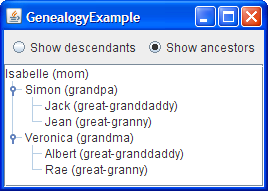
The following figure shows an application called GenealogyExample that displays the descendants or ancestors of a particular person.
Running Codes
0 comments:
Post a Comment