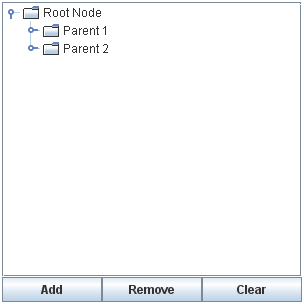
The following figure shows an application called DynamicTreeDemo that lets you add nodes to and remove nodes from a visible tree. You can also edit the text in each node.
Here is the code that initializes the tree:
rootNode = new DefaultMutableTreeNode("Root Node");
treeModel = new DefaultTreeModel(rootNode);
treeModel.addTreeModelListener(new MyTreeModelListener());
tree = new JTree(treeModel);
tree.setEditable(true);
tree.getSelectionModel().setSelectionMode
(TreeSelectionModel.SINGLE_TREE_SELECTION);
tree.setShowsRootHandles(true);
By explicitly creating the tree's model, the code guarantees that the tree's model is an instance of DefaultTreeModel. That way, we know all the methods that the tree model supports. For example, we know that we can invoke the model's insertNodeInto method, even though that method is not required by the TreeModel interface.
To make the text in the tree's nodes editable, we invoke setEditable(true) on the tree. When the user has finished editing a node, the model generates a tree model event that tells any listeners — including the JTree — that tree nodes have changed. Note that although DefaultMutableTreeNode has methods for changing a node's content, changes should go through the DefaultTreeModel cover methods. Otherwise, the tree model events would not be generated, and listeners such as the tree would not know about the updates.
To be notified of node changes, we can implement a TreeModelListener. Here is an example of a tree model listener that detects when the user has typed in a new name for a tree node:
class MyTreeModelListener implements TreeModelListener {
public void treeNodesChanged(TreeModelEvent e) {
DefaultMutableTreeNode node;
node = (DefaultMutableTreeNode)
(e.getTreePath().getLastPathComponent());
/*
* If the event lists children, then the changed
* node is the child of the node we have already
* gotten. Otherwise, the changed node and the
* specified node are the same.
*/
try {
int index = e.getChildIndices()[0];
node = (DefaultMutableTreeNode)
(node.getChildAt(index));
} catch (NullPointerException exc) {}
System.out.println("The user has finished editing the node.");
System.out.println("New value: " + node.getUserObject());
}
public void treeNodesInserted(TreeModelEvent e) {
}
public void treeNodesRemoved(TreeModelEvent e) {
}
public void treeStructureChanged(TreeModelEvent e) {
}
}
Here is the code that the Add button's event handler uses to add a new node to the tree:
treePanel.addObject("New Node " + newNodeSuffix++);
...
public DefaultMutableTreeNode addObject(Object child) {
DefaultMutableTreeNode parentNode = null;
TreePath parentPath = tree.getSelectionPath();
if (parentPath == null) {
//There is no selection. Default to the root node.
parentNode = rootNode;
} else {
parentNode = (DefaultMutableTreeNode)
(parentPath.getLastPathComponent());
}
return addObject(parentNode, child, true);
}
...
public DefaultMutableTreeNode addObject(DefaultMutableTreeNode parent,
Object child,
boolean shouldBeVisible) {
DefaultMutableTreeNode childNode =
new DefaultMutableTreeNode(child);
...
treeModel.insertNodeInto(childNode, parent,
parent.getChildCount());
//Make sure the user can see the lovely new node.
if (shouldBeVisible) {
tree.scrollPathToVisible(new TreePath(childNode.getPath()));
}
return childNode;
}
The code creates a node, inserts it into the tree model, and then, if appropriate, requests that the nodes above it be expanded and the tree scrolled so that the new node is visible. To insert the node into the model, the code uses the insertNodeInto method provided by the DefaultTreeModel class.
Running Codes
0 comments:
Post a Comment